



Click Control Key below  located in the top left corner of the Live Cam Screen to have PAN & ZOOM capabilities. Click on the ARROWS  to direct the camera. Click on the PLUS/MINUS  to zoom camera in/out. |
*If you do not see the control key above users will need to click on the drop down arrow  , scroll down to How to control PTZ and select PTZ control bar for control key to appear in top left corner.
To see 1 of the 7 Live Cam Pre-Set Views listed below click on ,
scroll & select the number that correlates to the Pre-Set View Key you want to see.
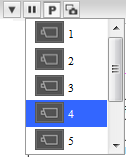
FRONT LIVE CAM PRE-SET VIEW KEY
above users will need to click on the drop down arrow , scroll down to How to control PTZ and select PTZ control bar for control key to appear in top left corner.
To see 1 of the 7 Live Cam Pre-Set Views listed below click on
, scroll & select the number that correlates to the Pre-Set View Key you want to see.
FRONT LIVE CAM PRE-SET VIEW KEY
| 1 | Mr.Brainwash, Agam, Grafter, Calder, Warhol, Hijack |
| 2 | Frame Table |
| 3 | Stan Slutsky |
| 4 | Steve Kaufman, Andy Warhol & Jozza |
| 5 | Andy Warhol |
| 6 | John "Crash" Matos, Pino, Marc Chagall, Yuroz, David Schluss, Freyman |
| 7 | MASSIVE SUMMER SALE UNDERWAY NOW! |
| HOME | SELL YOUR ART | VIEW CART | REQUESTS | QUOTES | MAILING LIST | BUYER INFO | SELLER INFO | SEARCH | CONTACT US | PRIVACY |
| copyright 2016 www.gallart.com |